Staring at a blank screen while trying to capture the “perfect” product shot is a common frustration for creators & e-com business owners.
You have the vision, rugged durability, luxury textures, or high-octane action. But translating that into a precise AI prompt often feels like guesswork.
Whether you’re battling generic results that lack “soul” or struggling to describe complex lighting like rim-lit embers or anamorphic flares, you’re likely searching for that specific spark to make a timepiece pop.
This collection of 5 AI prompts for wristwatch photos solves the “blank-page syndrome,” offering high-impact blueprints to transform your watch concepts into professional, scroll-stopping advertisements.
Why do most AI prompts fail?
AI prompts often fail because they lack structural hierarchy.
Without specific direction, AI defaults to “safe” averages, resulting in distorted dials, plastic textures, and cluttered backgrounds that swallow the product.
When the model tries to render intricate gears and vast landscapes simultaneously, it loses focus, leading to warped symmetry and awkward positioning.
To fix this, your prompts must prioritize the subject first. By explicitly defining facial focus (the watch dial) and direct lighting, you anchor the AI’s attention.
Adding emotional cues like “resilient” or “weathered” gives the metal character, while a shallow depth of field ensures the background stays secondary.
This targeted approach transforms a generic digital render into a sharp, photorealistic masterpiece.
What to include in prompts for the best output?
To get a high-end, professional result for your wristwatch ads, you need to think like a director.
Here is how each element specifically influences the AI’s rendering engine:
#1 Scene
The scene sets the narrative and scale. Without a defined scene (e.g., “a violent night collision”), the AI defaults to a generic studio background. A strong scene description tells the AI how to interact with the environment, creating “interaction points” like water splashes or flying sparks that make the product feel integrated rather than “photoshopped” in.
#2 Subjects
The subject is the anchor of the image. Being hyper-specific about materials (e.g., “brushed titanium,” “sapphire crystal,” “textured leather”) prevents the “plastic” look. It tells the AI which textures to prioritize, ensuring the watch looks like a physical, weighted object rather than a flat digital icon.
#3 Facial Details
In watch photography, the “face” is the dial. Specifying symmetry, sharp numerals, and hand placement (like the “10:10” position) prevents the AI from “hallucinating” jumbled text or warped gears. It forces the model to allocate more pixels to the intricate details of the dial, where the viewer’s eye lands first.
#4 Lighting
Lighting defines depth and shape. Without lighting cues, AI images look flat. Terms like “rim lighting” create a silhouette that separates the dark watch from a dark background, while “caustic reflections” or “volumetric fog” add 3D realism by showing how light physically travels through the air and bounces off the metal.
#5 Background
The background provides context and mood without stealing the spotlight. By describing the background as “blurred,” “distant,” or “out of focus,” you utilize the “Titan” effect—where massive elements (like mountains or skyscrapers) feel epic but don’t clutter the composition. It ensures the “Hero” remains the hero.
#6 Realism Controls
These are your technical “polish” settings. Using photography terms like “100mm Macro,” “f/2.8,” and “Shot on Arri Alexa” acts as a filter that overrides the AI’s tendency toward “stylized” or “cartoony” outputs. It forces the grain, color science, and depth of field to mimic a real-world professional camera.
5 AI prompts to create stunning wristwatch ads
#1 In Rain
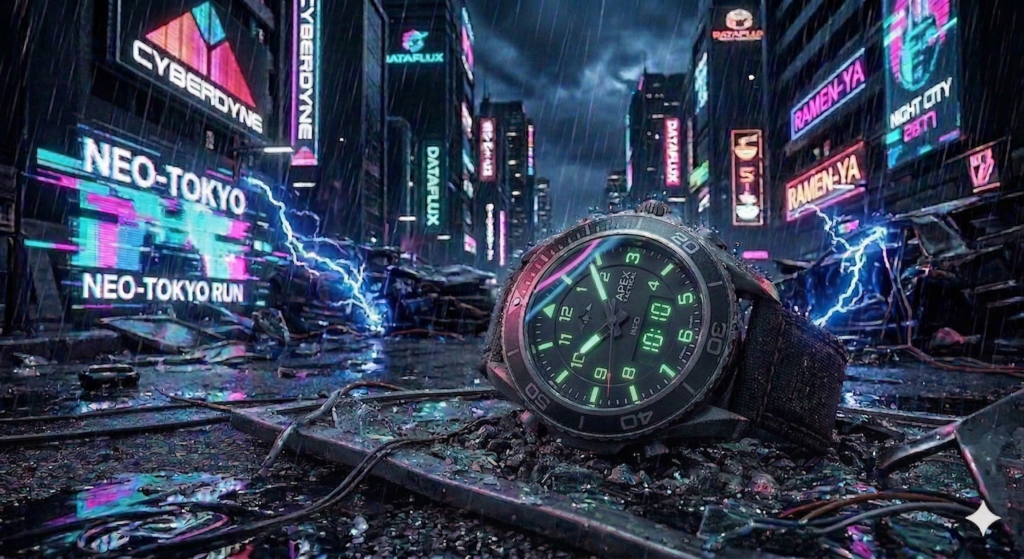
Prompt: “A military watch sits amidst the rainy, neon-drenched wreckage of a futuristic street chase. Electric blue sparks and holographic glitches swirl around the shattered glass. In the background, towering obsidian skyscrapers with glowing advertisements loom like digital titans. The watch reflects vibrant pink and teal light, hyper-realistic rain droplets, cinematic 8k.“
#2 In a sandstorm
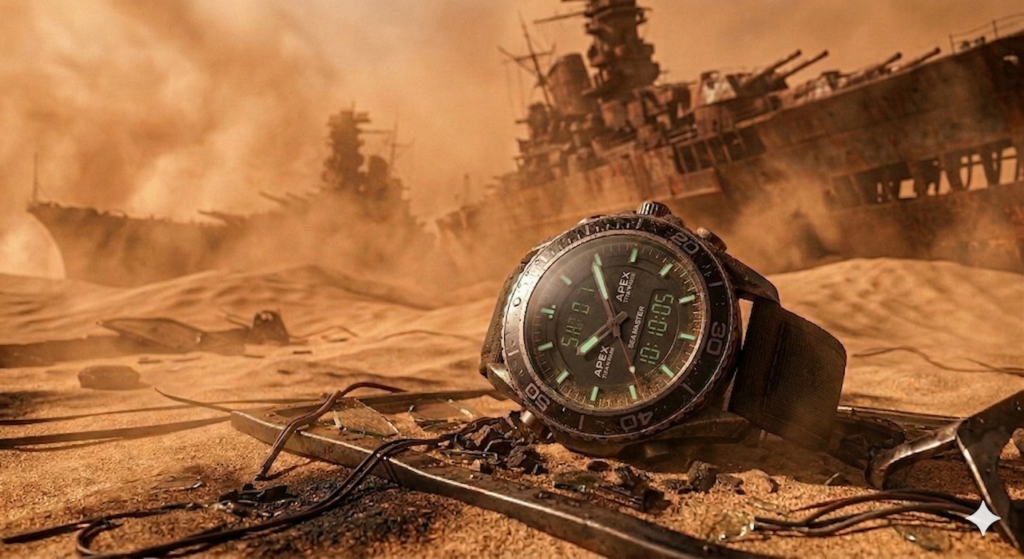
Prompt: “A military watch is partially buried in scorched sand following a massive desert explosion. Swirling dust storms and orange heat haze fill the air. In the background, rusted, skeletal remains of giant warships rise from the dunes like metallic titans. Gritty, high-contrast lighting, macro detail on the scratched metal casing, masterpiece photography.”
#3 Underwater
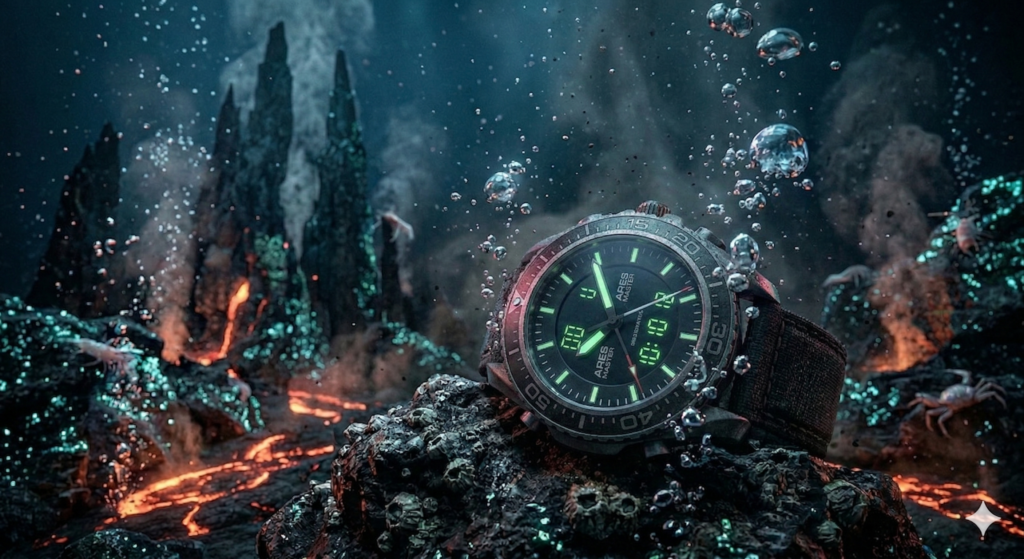
Prompt: “A military watch remains strapped to a submerged rock after a violent underwater volcanic eruption. Bubbles, glowing lava vents, and dark silt swirl around the dial. In the background, jagged hydrothermal vents rise like obsidian titans from the ocean floor. Bioluminescent lighting, cinematic atmosphere, ultra-realistic water refraction and particles.”
#4 On the asteroid belt
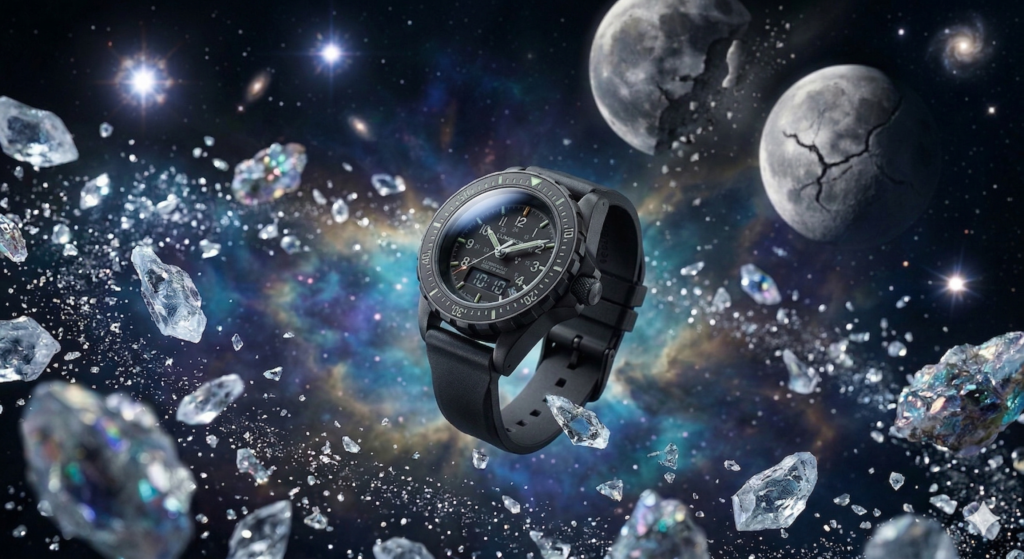
Prompt: “A military watch floats through a crystalline asteroid belt after a planetary collision. Stardust, glowing nebula gases, and shimmering ice shards swirl around the watch. In the background, fractured moons rise like celestial titans against a backdrop of distant exploding stars. Dreamy yet sharp cinematic lighting, hyper-detailed textures, surreal masterpiece.”
#5 High contrast black and white aesthetic
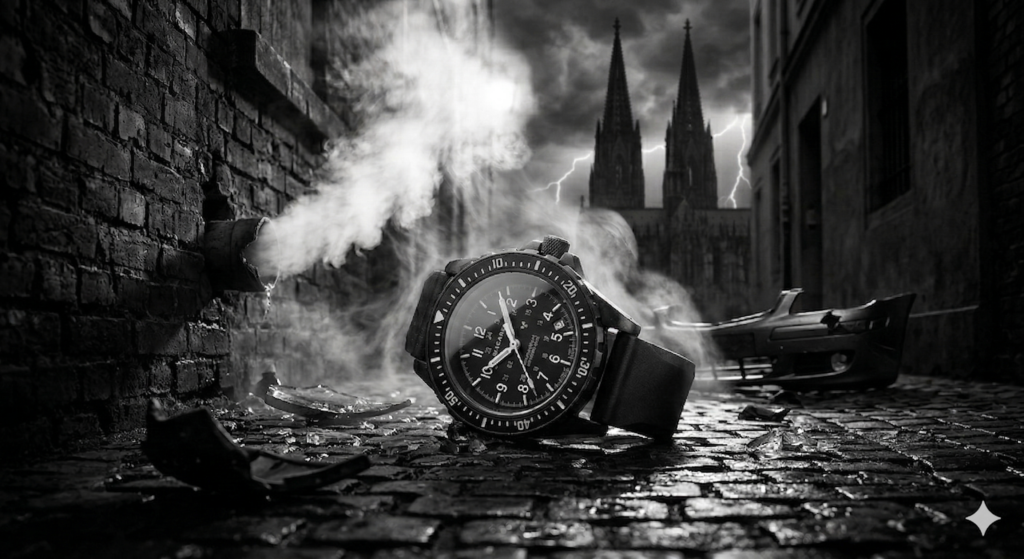
Prompt: “A military watch lies on a rain-slicked cobblestone alleyway after a high-speed crash. Thick white steam from a broken pipe and deep shadows swirl around the scene. In the background, gothic cathedral spires rise like shadowy titans against a stormy, lightning-lit sky. High-contrast black and white aesthetic, dramatic rim lighting, moody and hyper-realistic.”
Troubleshooting AI prompts for wristwatch photos
When your AI-generated watch ads aren’t hitting the mark, it’s usually due to a “skill gap” in how you’re directing the AI rather than a flaw in the tool.
Here are the top 5 troubleshooting steps to fix common issues like distorted dials or “soulless” generic results:
#1 Correct Distorted Dials and Text with “In-Painting” or Refiners
AI often struggles with the intricate symmetry of watch faces or spelling “normal” correctly.
Fix: Use an “Area Editing” or “In-Painting” tool to select just the watch face and re-prompt specifically for that section (e.g., “symmetrical watch dial, sharp numerals”). You can also use dedicated AI enhancers like the Arc Tencent Face Restorer (originally for faces, but effective for misaligned eyes/nostrils and similar small symmetrical features) to fix warped details.
#2 Fix “Plastic” or Unnatural Textures with Imperfections
AI models often interpret fine textures as “noise” and smooth them out, leading to a fake, plastic look.
Fix: Explicitly add keywords for imperfections like “micro-scratches on steel,” “brushed metal texture,” or “dust particles in the air”. This forces the AI to keep the details that make the material look real.
#3 Resolve “Scale Confusion” Between Product and Background
A common fail is the “Weird Scale” issue, where a watch looks unrealistically massive next to a mountain or tiny inside a palace.
Fix: Specify the camera distance and focal length. Instead of just “watch in mountains,” use “Macro shot of a military watch, enormous mountains in the distant blurred background, 100mm lens” to define clear spatial relationships.
#4 Balance the “CFG Scale” to Prevent Distortion
The Classifier Free Guidance (CFG) scale determines how strictly the AI follows your text.
Fix: If the image looks “burnt,” overly sharp, or distorted, your CFG is too high (above 12). If it’s ignoring your specific watch details, it’s too low (below 5). Aim for the “sweet spot” of 7 to 9 for the best balance of creativity and instruction.
#5 Simplify “Overloaded” Prompts
Cramming too many dynamic elements, like sparks, smoke, rain, and a collision, can overwhelm the model’s limited computational resources, resulting in a “jumbled” or “crumpled” image.
Fix: Start with a “Core Subject” (the watch) and one environment detail. Once you get a good base image, use it as a reference or gradually add the “chaos” elements (like flying embers) in subsequent iterations.
For post-processing, tools like the Dzine AI Face Repair or Invoke’s toolkit can help retouch blurry hands or strange artifacts after the initial generation.
Additional camera settings you can include in your prompts
Here are the key technical settings to bake into your AI prompts for wristwatch photos:
#1 Lens Selection & Focal Length
The lens dictates how the watch is “compressed” against the background.
- 85mm or 100mm Macro: Use this for “Hero Shots.” It creates a beautiful, natural compression that makes the watch face the undisputed star.
- 35mm Wide Angle: Best for environmental storytelling, where you want to see the rugged mountains or city spires in the background.
- Anamorphic Lens: Adds those cinematic horizontal blue flares and a slightly “oval” bokeh, perfect for that Noir or Cyberpunk aesthetic.
#2 Aperture & Depth of Field (DoF)
This controls what is in focus and how “creamy” the background looks.
- f/1.8 to f/2.8 (Shallow DoF): Creates a “bokeh” effect, where the watch is sharp but the sparks and smoke are beautiful, blurry orbs of light.
- f/8 to f/11 (Deep DoF): Ensures every detail from the watch’s ticking hands to the distant mountain peaks is crisp and clear.
#3 Lighting Terminology
Instead of just saying “bright,” use professional lighting setups to guide the AI.
- Rim Lighting: Highlights the edges of the watch casing, making it “pop” off a dark background—essential for the “night collision” prompt.
- Chiaroscuro / High Contrast: Creates deep, dramatic shadows and bright highlights, ideal for the Noir Thriller style.
- Softbox / Diffused Lighting: Use this for luxury or minimal styles to avoid harsh glares on the watch glass.
#4 Advanced “Pro” Keywords
- Shot Type: Specify “Extreme Close-Up (ECU)” for texture details on the strap, or “Low Angle” to make the watch feel dominant and powerful.
- Atmospherics: Use “Volumetric Fog” or “Ray Tracing” to help the AI render how light interacts with smoke and embers.
Pro-Tip: Add “Shot on Arri Alexa, 85mm Zeiss lens” to the end of your prompts for an instant jump in cinematic texture.
AI prompts for wristwatch ads cheatsheet
| Feature | Pro Keyword to Add | Visual Result |
|---|---|---|
| Lens / Focal Length | 100mm Macro Lens | Captures microscopic textures on the dial and gears. |
| Lens / Focal Length | 35mm Wide Angle | Shows the watch within a vast, epic landscape. |
| Depth of Field | f/2.8 Aperture | Deeply blurred background (bokeh) that isolates the watch. |
| Depth of Field | Deep Focus / f/11 | Everything from the watch to the background is razor-sharp. |
| Lighting Style | Rim Lighting | A thin “halo” of light that defines the watch’s silhouette. |
| Lighting Style | Volumetric Lighting | Visible “god rays” shining through smoke, dust, or mist. |
| Angle | Low-Angle Hero Shot | Makes the watch look massive, powerful, and “titan-like.” |
| Color Grade | Teal and Orange | The classic “Hollywood” look for high-contrast action. |
| Camera Model | Shot on Arri Alexa | Provides a soft, filmic texture rather than a “digital” look. |
Create your own prompts to create custom AI images for wristwatches
You can create custom prompts for pretty much any product using this “Golden Formula”.
A simple, repeatable structure your readers can use to build high-converting AI images every time.
The Golden Formula to create AI prompts for Wristwatch Photos
[Subject] + [Action/State] + [Environment/Background] + [Atmospheric Details] + [Technical Camera Settings] + [Lighting Style]
If you apply this to a luxury diver watch, the prompt looks like this:
- Lighting Style: Dramatic rim lighting, cool cinematic color grade.
- Subject: A premium titanium diver watch with a deep sea-green dial.
- Action/State: Suspended mid-air as water droplets explode outwards.
- Environment: A dark, moody infinity pool overlooking the stormy ocean.
- Technical Settings: Shot on 100mm Macro, f/2.8, sharp focus on the bezel.
- Atmospheric Details: Shimmering spray, caustic light reflections, heavy mist.
Why This Works
- Precision: It moves the AI from “guessing” to “executing” your specific vision.
- Layering: By starting with the subject and ending with technicals, you ensure the AI prioritizes the watch before applying the “look.”
- Flexibility: Readers can swap any “block” to change the vibe from a rugged military mountain scene to a sleek, minimalist corporate office.
Pro-Tip: The more specific you are about the materials (brushed steel, sapphire crystal, leather grain), the more the AI will move away from that ‘flat’ digital look and toward high-end photography.